

Although they supply US and Canada it's not really worth it outside Europe - let me know if you know a good company for there!


Cutting your Fuel Bills
Just read an interesting article in Wired that I’d like to share with you. It was entitled how to cut your fuel bills by 30%, which is something that appeals to me !
It was a UK edition so maybe not much help to others but if you know of similar sites let me know.
First point was to make sure you buy from the cheapest petrol or Gas station – www.petrolprices.com was mentioned for UK prices. Although it was mentioned that don’t go out of your way too much to buy from a slightly cheaper outlet. In fact a special journey for fuel makes little sense environmentally – so check the prices on a regular route of yours and don’t drive 20 miles to save a few pennies !
They also mentioned about losing weight in your car, apparently driving with an empty boot improves the efficiency by 2%. Mind you not sure how they come up with that figure, it surely would vary hugely depending on what you had in your boot. But it makes sense even driving with a full fuel tank means the car is less efficient.
And finally learn to Eco-drive, now I’ve tried this and it does save money if your car has a mpg computer you can see it working.
- Avoid sharp stops and braking hard
- Accelerate gradually and use your gears to slow down
- Most efficient RPM is 2000-2500 revs
- Change gears up quickly to maintain that RPM
- Stuck longer than one minute then switch off !
A useful article, remember less fuel we burn, better for our environment and our pocket and every little helps.
When you have to stop Refilling your Toner Cartridges
It can’t go on forever you know, although it’s simple to refill the vast majority of toner cartridges eventually you’ll have to buy a new one. Although your cartridge initially will just run out of ink, eventually other components in the cartridge will begin to fail.
For those of us who have got used to refilling our own cartridges, the final arbiter of when a toner cartridge is no longer refillable is really down to each of us. You might think it’s a bit of a nuisance having to monitor the quality of each print out but lets face it we all do that anyway without a second thought.
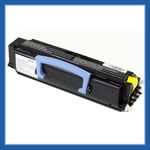
So what’s likely to be the signs that it’s time to stop refilling your cartridge and face that bill for a new set? Well if you’ve already refilled the toner a few times, it’s probably best to keep a closer eye out – the number of times you can refill will vary hugely from cartridge to cartridge and indeed between different manufacturers. I can’t give a figure but my record is 4 refills before needing to get a new cartridge for an older HP Laserjet model, I know many people feel happy with refilling once or twice though and then buy a new cartridge automatically.
Even if you have only refilled a cartridge once with compatible toner then you’ve helpded the environment considerable and your pocket too.
But anyway the great thing is that when the toner cartridge is starting to fail completely the very first signs will be on the printed page. Spots, dots or dark areas on the printout are a common sign, also void or completely blank areas. These will often be repeated in a pattern down the page, another common sign is razor thin line appearing down the page.
When you start to see these signs then I’m afraid it’s time to order a new cartridge either new or remanufactured. The choice is yours but I have had problems with cartridges that have been remanufactured and will normally buy a new cartridge and then repeat my refilling toner process. The amount of money you will save is quite staggering, especially if you’ve refilled a few times.
Of course there may be unused toner left in the cartridge when the other components start to fail. If this is the case you can reclaim the ink and reuse that in your next cartridge, be careful though it’s sometimes trickier to get the toner out of a cartridge. I have to say I rarely bother to reclaim any toner, if you don’t try and reclaim any ink from the waste compartment of the cartridge as this toner colour will be contaminated. All in all it’s pretty easy to tell when it’s time to stop refilling your cartridges, just look at the printouts – simple really.
Refill Toner Review
Now I know despite being hugely ripped of for replacement cartridges, many people feel a little unsure about refilling their toner, so I thought I’d post a little refill toner review. Now the method will vary slightly depending on the printer cartridge your going to refill but essentially the vast majority now focus on one distinct method.
This method is the ‘make a hole’ and ‘pour’ method. Now if you are really lucky on the side of your cartridge their may be a little stopper that can be opened. If you have you’re in luck as all you have to do is open the stopper and pour in some replacement toner ink. Difficult huh ! Most cartridges used to have these little refill plugs but the printer companies now have helpfully replaced them as they realised they can make loads more money by selling you new ones or refurbishing your existing cartridges (the annoying thing is they pretend to be eco-friendly by doing this!).
If the printer companies put back these little stoppers it would have a huge environmental benefit, people could refill toner in their cartridges with no effort at all. Unfortunately I don’t think this is likely unless they are forced by legislation. The reality is most of us will be faced with the problem of the cartridge being sealed so will have to find a way of opening the cartridge.
Refill Toner Review – Some Steps
So let’s first start by looking at the tools needed, you can either put these together yourself or the companies who supply refill toners will sell you one. The picture here contains the standard items in kit, which is all you’ll need on most cartridges, they’re not expensive I think I paid about $14 for my first kit to refill toner.
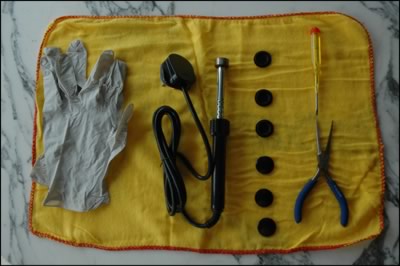 Typical Toner Refilling Kit
Review Toner refill Kit
You can see from the kit, there’s some gloves, stoppers, pincers, plugs and a soldering iron. The most important item is probably the soldering iron with a little adapter. To use this you simply let it heat up and touch the side of the toner cartridge. A little hole will be created and you use this to pour the replacement toner into the cartridge.
You can then use the stopper to reseal the hole and make a nice neat job, and that’s basically it. No really for many printer cartridges that is all you need to do. It takes a few minutes and provided you don’t pour the toner all over your shoes instead of the cartridge and use quality compatible toner your toner cartridge will be as good as new.
I’d like to say it takes great skill but actually it doesn’t – it can’t do I have done it on many occasions.
I’d like to say a little word in my mini toner refill review about the replacement ink. This is probably the most important part of refilling the cartridge, if you fill it with rubbish then you will get poor results. Fortunately most of the companies I’ve used all provide top quality ink which is exactly the same as the toner you will get in the original cartridges.
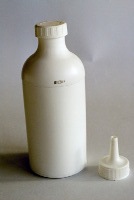 Compatible Ink
Toner Refill Bottle
When you shake the toner bottle, the ink is so fine that it behaves like liquid. This makes it very easy to pour into the hole you have created, obviously be sensible and don’t do this over your beige lounge carpet though! Most of the bottles are supplied with a pouring nozzle like this one in the image, it really is a very simple job to refill toner.
Once you’ve poured the toner in, then you just have to use one of the stoppers in the kit to seal the unit. It’s nothing fancy as long as the toner doesn’t leak through the hole you should be fine. Don’t worry if you don’t have any stoppers, you can use strong packing tape just as well, it doesn’t look as neat but works fine.
Here’s one that has been completed and ready to go back into your printer. So I urge you to give it a go, you will be making a big difference to your pocket and also it’s saving new cartridges being produced (takes about 2 litres of oil to produce each one) plus the old one going to landfill.
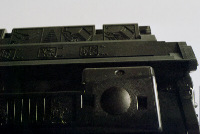
Example Toner stopper
You can often refill your cartridges many times and you’ll save a small fortune on replacement toner. The cartridges are all self contained so there’s no risk to your printer and if you buy quality ink you’ll not notice any reduction in quality of your printing either.
Many schools and businesses refill their cartridges routinely and literally save thousands every year, the savings do add up. I hope my brief toner refill review has given you the impetus to give it a go, it really is simple and the savings can be considerable! Here’s the company I use if you want a recommendation – Toner Topup
Refill Toner HP 2600
So can you refill toner in the HP 2600? Hewlett Packard printers used to be some of the easiest printers to refill anywhere, which was good news for companies who had the sturdy laserjet models printing all day.
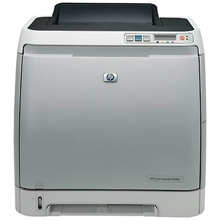
Toner refill for HP2600
But alas of course HP realised that huge profits were being wasted by allowing people to refill these cartridges easily, sure it’s the green thing to do and reduces the environmental impact but that doesn’t mean much to the shareholders !
So the usual trick of adding a little chip to the cartridges happened, the HP 2600 had a little killer chip fitted to the toner cartridge to stop you refilling. Imagine it’s like a car company fitting a device that stopped your car working after 50,000 miles so that you had to get a new one. Incredible that this practice is even allowed as frankly it’s disgusting faced with the environmental issues of the world.
So Refill Toner HP 2600 – YES or NO
Well yes fortunately it is still quite simple, if you want to refill the HP 2600 cartridge you can buy little kits that allow you to refill it. These usually have a little tool for creating a refiller hole, a little stopper and a small chip to replace the one HP puts on the HP 2600 cartridge.
It takes a few minutes to do, no real skill involved and if you buy a kit with proper compatible toner , no difference in print quality. You can actually do without the chip on certain models as the chip can be overridden but check with the experts for that.
Not sure how much the cost of new toner cartridges for the HP 2600 but refilling should save you between 50 and 80% of the cost each time you refill. Remember though refilling your toner is simply replacing the ink, if the cartridge doesn’t work too well or there are printing problems – you’ll still have them after refill toner HP 2600, so buy a new cartridge in that case.
Can you Refill Laser Printer Cartridges
A question that is often asked, can you refill laser printer cartridges. Now you’ll get different answers from whoever you ask, ask a printer company or someone who sells laser cartridges and you’ll get lots of answers. There will be talk of voiding warranties, damage to printers and poor quality – all of which are simply not true.
To start on the warranty void, In Europe and in US you are not allowed to make the condition of warranty dependent on purchasing specific (i.e. their) toner cartridges. Mind you when you start looking at the exorbitant cost of some branded laser cartidges it becomes fairly irrelevant – it is not uncommon for the cost of a replacement set of toner cartridges to be well in excess of the cost of the printer.
But is damage to the printer possible, if you have a look at any printer cartridge for a laser printer you’ll notice that it is fairly self contained. The unit contains all its own internal mechanisms, think logically how could that actually damage the inside of your printer. The main risk is inserting the cartridge in incorrectly, a danger that could happen with a brand new cartridge
Most laser printer cartridges refill kits don’t touch any of the working mechanisms, they simply refill the ink in the cartridge. Of course the printer companies have made this more difficult on purpose – by removing the refiller tab, and appallingly placing a chip on the cartridge so you can’t reuse it. But fortunately most laser printer cartridges can still be refilled relatively easily.
So can you Refill Laser Printer Toner Cartridges
The simple answer is yes,occasionally there are technical issue with a few cartridges so it’s always best to ask and expert and get a specific guide to refilling your particular toner cartridge. But in general it’s fairly simple,
- make hole in cartridge
- refill toner through hole
- put stopper in to seal cartridge
- replace computer chip if required
- carry on printing
It sounds simplistic but for most cartridges, that’s all there is to it. You are stopping the totally unnecessary production of a new cartridge – and the associated carbon cost, saving the landfill of the old cartridge. Plus you also will generally save between 40 and 85% of the cost of buying new cartridges – savings that are potentially hundred of dollars.
It takes a little effort, sure but if you buy a kit, it’s very simple to do and only takes a few minutes. Of course I’ve missed out one element in the question of refilling laser cartidges. Is the print quality as good, as long as you buy the correct compatible toner – there will be no difference. When the other components in your laser cartridge start to fail then you will begin to see an affect on the quality but then it’s time to buy a new cartridge hopefully by then you’ll have refilled that cartridge several times and saved yourself a small fortune.
Here’s the company I recommend for Europe and UK (they do USA but you have to watch the shipping costs obviously) – Toner Topup
They have a product selector which you can check to see what is involved with refilling your laser printer cartridge.